Capturing waveforms from Tektronix Oscilloscopes
During a project I was working on recently, I wanted to be able to capture waveforms from a Tektronix oscilloscope for analysis on a computer. Matlab’s Instrument control toolbox can be used to do this, but it is quite expensive to buy – it is probably worth it if you’re doing fairly complex tasks though. I spent a few hours today and managed to write a very simple python program (which I will slowly extend with more capabilities) that can capture raw data samples from a Tektronix DPO4034B oscilloscope. I expect this code to work on other scopes with minor modifications.
To enable capture, on the scope you have to start up the Socket server. To get there, I use “Utility”->”I/O”->”Socket Server” and enable the Socket server, with the “Terminal” protocol, and the desired port. The scope needs to be connected to the PC via ethernet. Ethernet configuration can be done via the I/O menu as well. I think this can also be extended via USB, but hopefully the open-source community will end up getting involved to make these kinds of features available.
Haven’t released this under any license yet (Clover is a place that loves open APIs so it’ll likely be made public at some point of time). This would have been useful to me had I found it something that worked easily and well, so I’m quite sure others may find use too – especially when one wants to do more complicated analysis on the signals than the oscilloscope might be able to by itself.
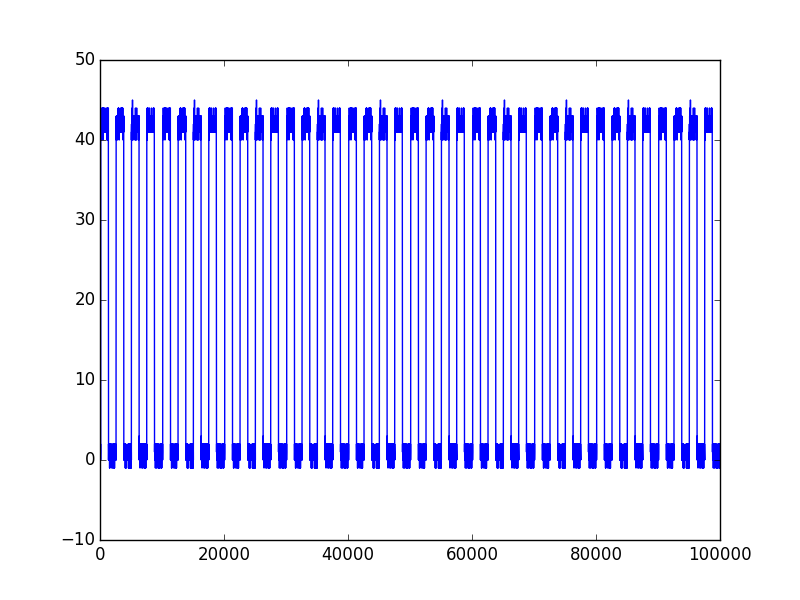
This is the code to capture the following snippet of data when a signal produced by toggling a GPIO every 1 ms is connected to channel 1 of the oscilloscope:
from tektronixScope import TektronixScope

HOST='192.168.0.x'
PORT='4000'

ts = TektronixScope(HOST,PORT)
print ts.getIDN()
scope_settings=ts.getSettings().settings_dict
ts.setLabelForChannel(1,'Test') # Label the channel Test
waveform = None
for i in range(10):
    ch1 = ts.transferWaveformForChannel(1)
    if i==0:
        waveform = ch1.waveform
    else:
        waveform = np.concatenate((waveform,ch1.waveform),axis=1)
plt.plot( waveform )
plt.show()
ts.closeConnection()
Heres a picture of data captured from the scope, plotted using Matplotlib: