Macbook Pro Upgraded: dual Hard drives (SSD for speed + HDD for space)
Yesterday, I upgraded my good old Macbook Pro (late 2010) with an SSD drive which has turned out to make it a lot faster in situations where there is a lot of disk read/write activity. I decided this was worth the investment (in terms of money) because the Corsair Force Series 3, (240 GB) SSD was only $180 and (in terms of time) there was a way to install the SSD card by replacing my Superdrive with this drive caddy.
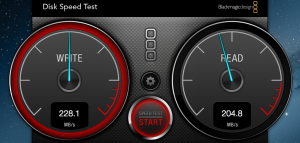
Benchmarked read-write speeds for the new drive in my SATA II Macbook Pro. Note that I might be losing out on some speed due to a slower controller (the drive supports SATA III @ 6GB/s while my motherboard only does 3GB/s).
So soon after both the packages arrived, I took apart my Macbook and installed the drive in place of the Superdrive. The new caddy fit almost perfectly (1 screw out of 5 was mis-aligned), but the other screws held everything in place securely enough to make that redundant.
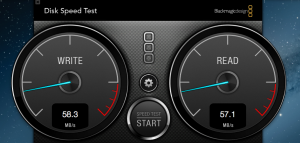
Read/Write speeds for the 1TB 5200 rpm Western Digital Hard-drive. These were the best results I could get – usually it hovered between 30 MB/s and 62 MB/s.
A benchmark of my other drive (a Western Digital 1TB WD10TPVT) showed just how appallingly slow it was ( 30 MB/s to 62 MB/s).
When I ran the same benchmark on my new drive, it turned out to be blazingly fast at speeds greater than 210 MB/s (which is between 7x and 3.5x of the previous speeds).
So a long story short – this upgrade should help my aging laptop handle large data-sets more easily, which should be useful in running multiple simulations simultaneously without bringing the laptop to its knees…. Which reminds me, I better get back to work again!